
How to access?
Web chat/agent: https://gpt.ntnu.no
Login with Feide.
API key:
We create personal API key for each user. Send e-mail to: help@hpc.ntnu.no
See more examples in this document.
Why it exists?
gpt.ntnu.no and gpt.uio.no is a collaboration between NTNU and UiO to provide access to LLMs (Large Language Model).
Access to LLMs is provided via Web Interface and API.
With local LLMs - data is transferred only inside university networks.
What models are available?
Models available (updated 2025-12-02)
| Model | Purpose | Comment | Hosted |
| GPT-OSS 120B | general purpose (recommended) | by OpenAI, for tasks which requires advanced analytics. | IDUN HPC cluster (local) |
| GLM 4.5 Air | AI coding assistant | by Chinese A.Ai, Sutable for task that requires deeper context and reasoning. IDUN HPC cluster | IDUN HPC cluster (local) |
| GPT-4o mini | general purpose | By OpenAI, the fastest of the smaller models – when you need with notes, brainstorming, drafting emails. | Microsoft Azur Cloud |
| Multilingual-E5-large-instruct | embedding | by Infloat, Microsoft Research Asia. The Multilingual-E5-Large-Instruct is an embedding model designed to handle multilingual text data (supports 100 languages). | IDUN HPC cluster (local) |
Web interface
Login with Feide. Choose model. Ask question:

Create AI assistant:

API
Do you need API token then send support email to: help@hpc.ntnu.no
Test you API token
with curl command:
$ curl \
-H "Content-Type: application/json" \
-H "model: gpt-oss-120b" \
-H "Authorization: Bearer ...API...TOKEN......." \
-d '{"model": "gpt-oss-120b", "messages":[{"content":"Test, please respond ok", "role":"user"}]}' \
https://gpt.ntnu.no/api/models/chat-completion
Output example:
{"id":"8a5f1bd56d934fb69605bb0bf37c2c1f","object":"chat.completion","created":1762253304,"model":"gpt-oss-120b","choices":[{"index":0,"message":{"role":"assistant","content":"ok","reasoning_content":"User says \"Test, please respond ok\". Simple. Respond \"ok\".","tool_calls":null},"logprobs":null,"finish_reason":"stop","matched_stop":200002}],"usage":{"prompt_tokens":72,"total_tokens":98,"completion_tokens":26,"prompt_tokens_details":null,"reasoning_tokens":0},"metadata":{"weight_version":"default"}}Example with Python
Create Python script chat.py to use API:
#!/usr/bin/python3
import sys
import requests

def chat_with_model(token,model,question):
    url = 'https://gpt.ntnu.no/api/models/chat-completion'
    headers = {
        'Model': model,
        'Authorization': f'Bearer {token}',
        'Content-Type': 'application/json'
    }
    data = {
      "model": model,
      "messages": [
        {
          "role": "user",
          "content": question
        }
      ]
    }
    response = requests.post(url, headers=headers, json=data)
    return response.json()

my_api_key = sys.argv[1]
my_model = sys.argv[2]
my_question = sys.argv[3]
answer = chat_with_model(my_api_key, my_model, my_question)
print(answer)
Output example:
$ python3 chat.py '…..API…TOKEN………' 'gpt-oss-120b' 'What is the tallest mountain in Norway? Answer with name only.'
. . .
. . .
{'id': '1cb7f9dd6c63422e9c183a5659926a46', 'object': 'chat.completion', 'created': 1762253012, 'model': 'gpt-oss-120b', 'choices': [{'index': 0, 'message': {'role': 'assistant', 'content': 'Galdhøpiggen', 'reasoning_content': 'User asks: "What is the tallest mountain in Norway? Answer with name only." So just the name: Galdhøpiggen. Provide only name.', 'tool_calls': None}, 'logprobs': None, 'finish_reason': 'stop', 'matched_stop': 200002}], 'usage': {'prompt_tokens': 80, 'total_tokens': 129, 'completion_tokens': 49, 'prompt_tokens_details': None, 'reasoning_tokens': 0}, 'metadata': {'weight_version': 'default'}}
Text embedding model
Example:
curl -X POST "https://gpt.ntnu.no/api/models/chat/completions" \
-H "Authorization: Bearer ...API...TOKEN......." \
-H "model: multilingual-e5-large-instruct" \
-H "Content-Type: application/json" \
-d '{ "inputs": "testing", "normalize": true, "truncate": true, "truncation_direction": "Right" }'
Visual Studio Code extensions
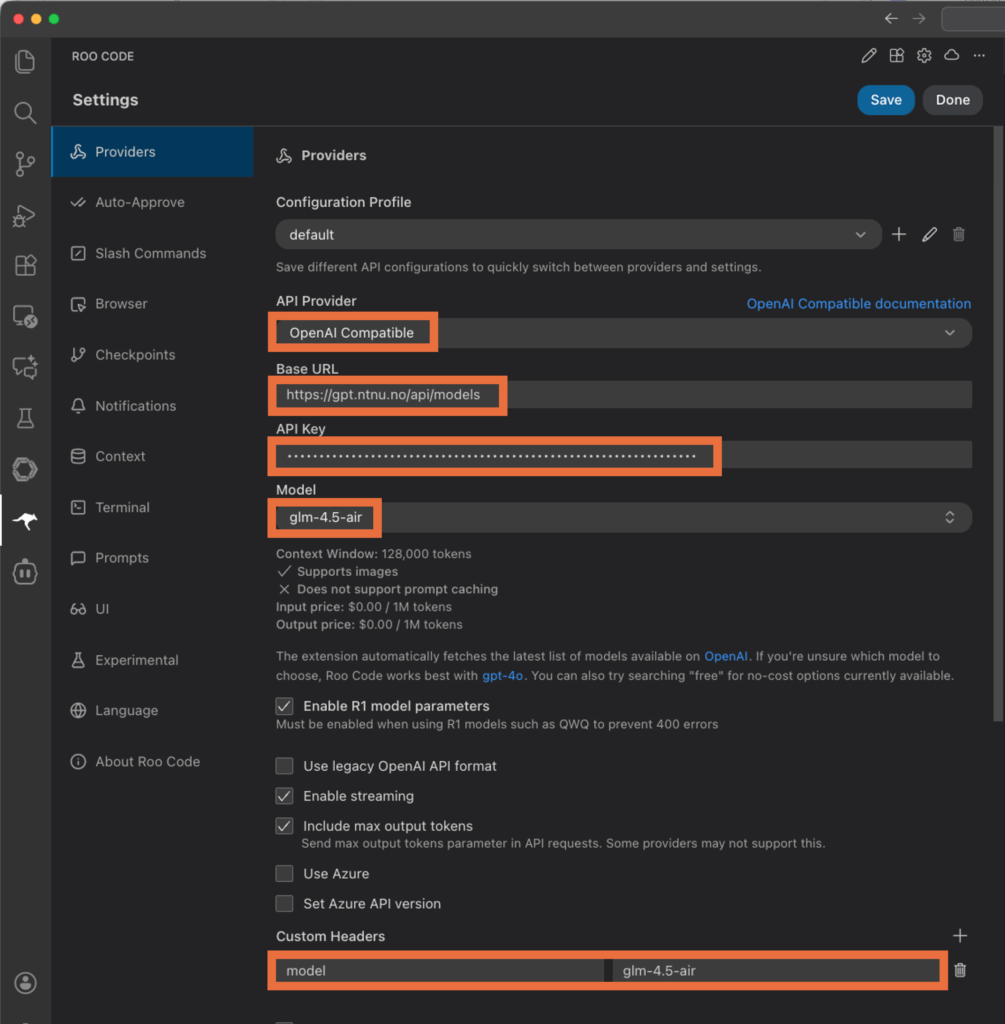
We tested extensions Roo Code, Cline other should work as well.
Roo Code configuration:
Cline configuration
