
IDUN HPC cluster provides access to LLMs ( running locally ).
Do you want web interface to work with LLM modes? Visit https://gpt.ntnu.no and read more here https://i.ntnu.no/wiki/-/wiki/Norsk/GPT+NTNU
Alternative web interface with Open WebUI: https://chat.hpc.ntnu.no
NOTE: user your short NTNU username to login.
Do you need LLM API for research or development?
API details:
Base URL: https://llm.hpc.ntnu.no/
API provider: LiteLLM or OpenAI compatible
Request personal API key: https://ai.hpc.ntnu.no/request-api-key
Other questions: send email to help@hpc.ntnu.no
LLM models
Updated: 2026-06-26
| Model ID | Input format | Created by | Country | License | Parameters | Context Window | Max input | Max output | Default reasoning |
|---|---|---|---|---|---|---|---|---|---|
| moonshotai/Kimi-K2.6 | text, image | Moonshot AI | China | Modified MIT | 1000B | 262144 | 174762 | 87381 | on |
| NorwAI/NorwAI-Magistral-24B-reasoning | text | NorwAI, NTNU | Norway | NorLLM License by NTNU | 24B | 294912 | 196608 | 98304 | on |
| norallm/normistral-11b-thinking | text | Nordic Language Processing Laboratory (NLPL) | Norway | Apache 2.0 | 11B | 98304 | 65536 | 32768 | on |
| NbAiLab/borealis-27b | text | National Library of Norway | Norway | NB-License | 27B | 131070 | 87380 | 43690 | - |
| openai/gpt-oss-120b | text | OpenAI | USA | Apache 2.0 | 117B | 131072 | 87380 | 43690 | on |
| Qwen/Qwen3-Embedding-8B | text | Alibaba Cloud | China | Apache 2.0 | 8B | 40960 | 20480 | 20480 | - |
| Qwen/Qwen3.8-27B-FP8 | text, image | Alibaba Cloud | China | Apache 2.0 | 27B | 262144 | 174762 | 87381 | medium |
| Inferact/GLM-5.3-NVFP4 | text | Z.ai | China | glm-5.3 | 753B | 600000 | 400000 | 200000 | max |
| mistralai/Mistral-Medium-3.5-128B | text, image | Mistral AI SAS | France | Modified MIT | 128B | 262144 | 174762 | 87381 | on |
| (DEMO) deepseek-ai/DeepSeek-V4-Flash-Vision-Exp | text, image | DeepSeek | China | MIT | 305B | 1048576 | 699050 | 349525 | high |
| (DEMO) zai-org/GLM-5.3-Flash | text, image | Z.ai | China | MIT | 321B | 1048576 | 699050 | 349525 | high |
NOTE 1: DEMO models are available via API. But they can be updated or removed without notification.
NOTE 2: context window = max_input_tokens + max_output_tokens. We configure 66% / 33%. For example for model moonshotai/Kimi-K2.6 with context window 262144 use:
- max_input_tokens: 174762
- max_output_tokens: 87381
How to access
IDUN LLM models are available from NTNU networks or NTNU VPN.
You can use IDUN LLM models via Desktop AI applications like:
- VS Code with extensions (Cline, Kilo Code, Zoo Code )
- ZED
- OpenCode
- Claude Code
Web chat/agent:
- Open WebUI: https://chat.hpc.ntnu.no
Login with your NTNU short username.
iPhone and Android applications like Apollo (tested)
API key:
Request personal API key: https://ai.hpc.ntnu.no/request-api-key
See more details and examples in this document.
Rate Limits
We are launching gpt.ntnu.no and it is using the same LLM modes. API users can make LLMs slow.
Please do not run heavy research LLM workloads during working hours. Best time for run big jobs:
- works days between 18:00 – 06:00 (evening, night)
- weekends without time limits
3 LLM models with rate limits now:
- openai/gpt-oss-120b
- moonshotai/Kimi-K2.6
Rate limits (defaults):
- TPM: 300000 (tokens per minute)
- RPM: 20 (requests per minute)
Contact us if you need to change your rate limits.
What about sensitive data?
All LLM models on IDUN are running locally and data is not leaving NTNU network.
- API calls go directly into the LLM model, and they are not stored.
- Web interface Open WebUI has feature "Temporary Chat". That chat is not saved. "Temporary Chat" is not enabled by default so users’ questions and answers are stored for user convenience. And user can delete saved conversations manually.
Temporary chat toggle is located in the top right corner:

Usage statistics: https://ai.hpc.ntnu.no/stats
Hardware:
Server with B300 288GB (NVFP4 support):
4 x B300 - Inferact/GLM-5.3-NVFP4
4 x B300 - moonshotai/Kimi-K2.6
Server with H200 141GB
1 x H100 - Qwen/Qwen3.8-27B-FP8
1 x H100 - openai/gpt-oss-120b
2 x H100 - mistralai/Mistral-Medium-3.5-128BServer with A100 80GB
1 x A100 - NbAiLab/borealis-27b
1 x A100 - NorwAI/NorwAI-Magistral-24B-reasoningServer with A100 40GB:
1 x A100 - Qwen/Qwen3-Embedding-8B and intfloat/multilingual-e5-large-instructServer with A100 40GB:
1 x A100 - norallm/normistral-11b-thinkingWeb interface (Open WebUI)
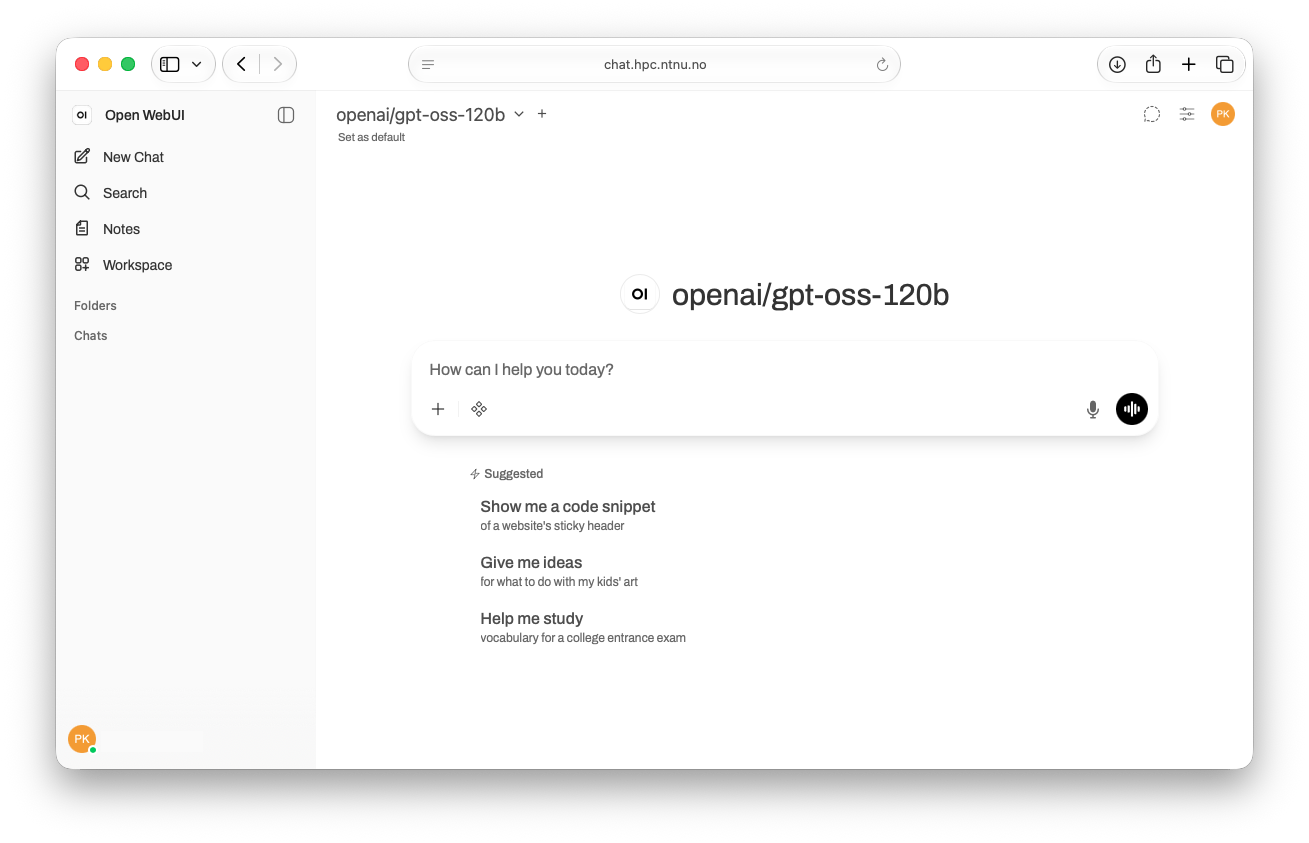
Open WebUI: https://chat.hpc.ntnu.no
API (OpenAI Compatible)
Request personal API key: https://ai.hpc.ntnu.no/request-api-key
https://llm.hpc.ntnu.no is a LLM gateway to access all LLMs on IDUN HPC cluster. It provides consistent openai compatible API.
You can see all endpoints on this web page https://llm.hpc.ntnu.no/
Visual Studio Code or VSCodium - extensions
There are several popular open source VS Code or VSCodium extensions:
- Cline (recommended)
- Zoo Code
- Kilo Code
- built-in "agent mode" in Copilot Chat
Cline - example configuration
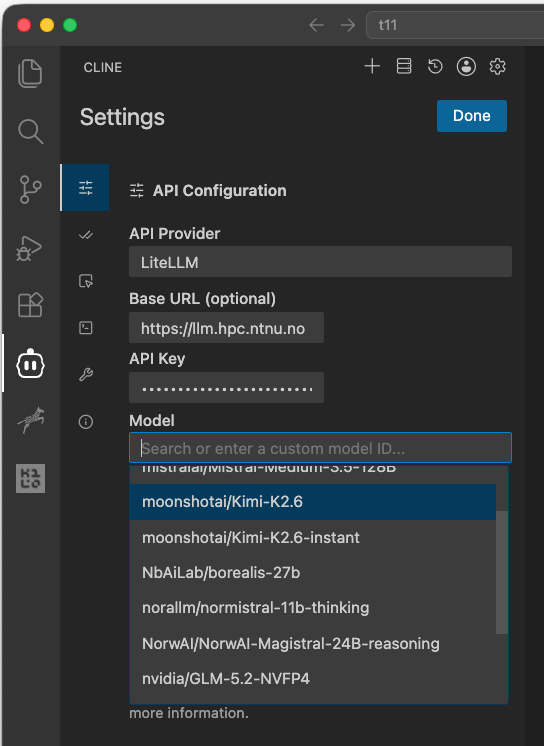
Zoo Code - example configuration:

VS Code - built-in "agent mode" in Copilot Chat
You can connect IDUN LLM models to Copilot Chat in VS Code.
1.
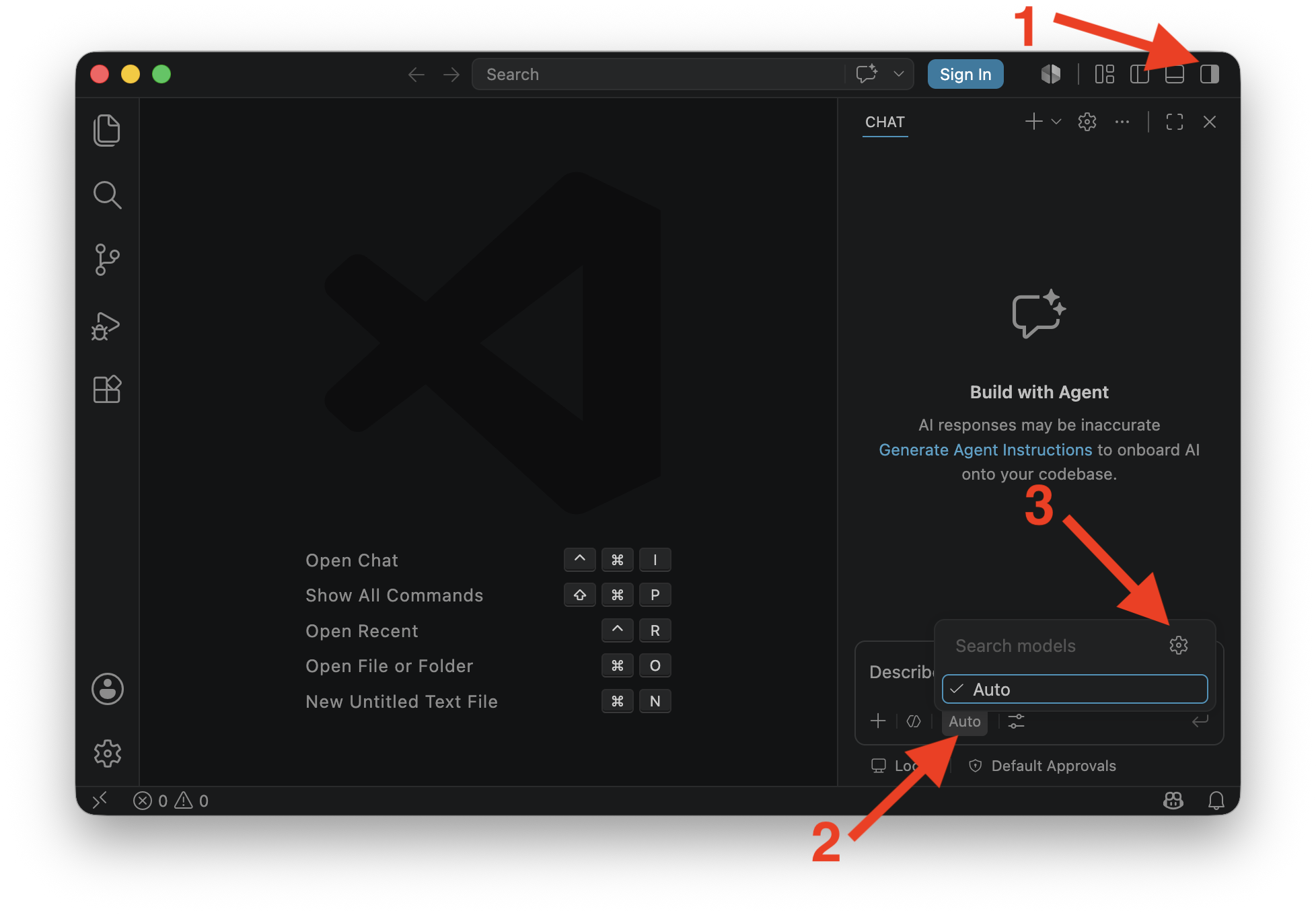
2.
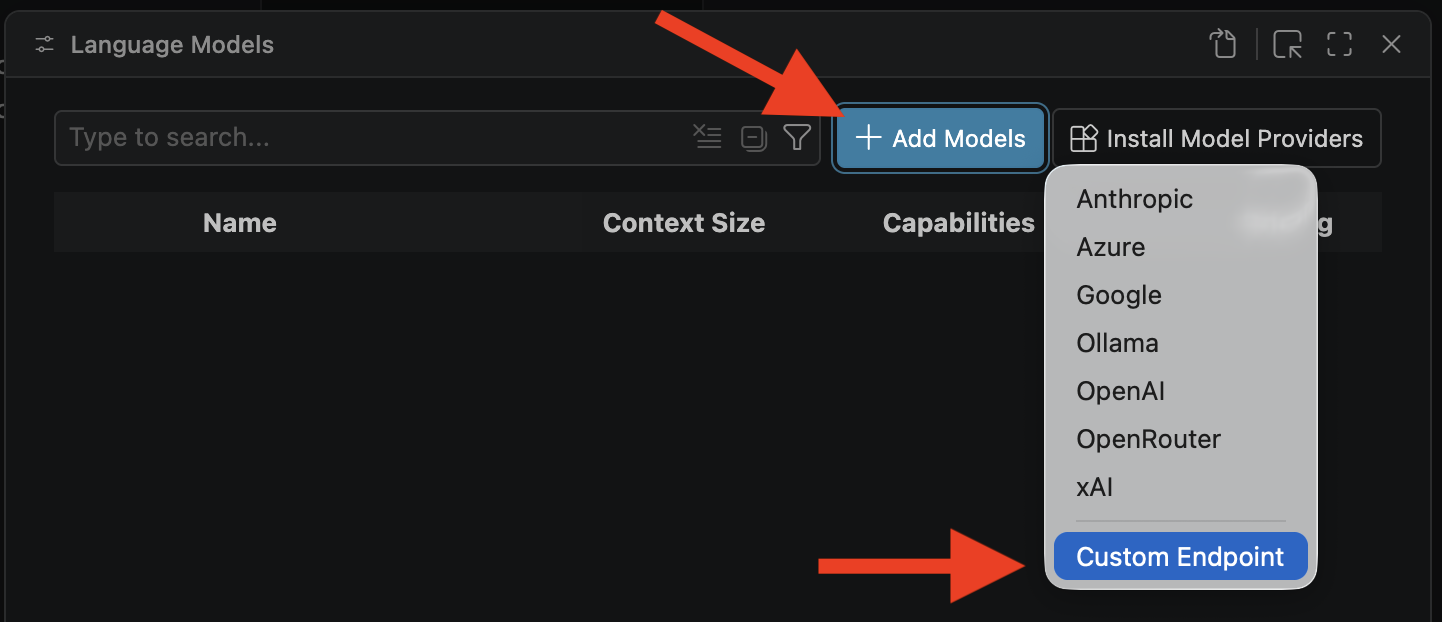
3.



4.
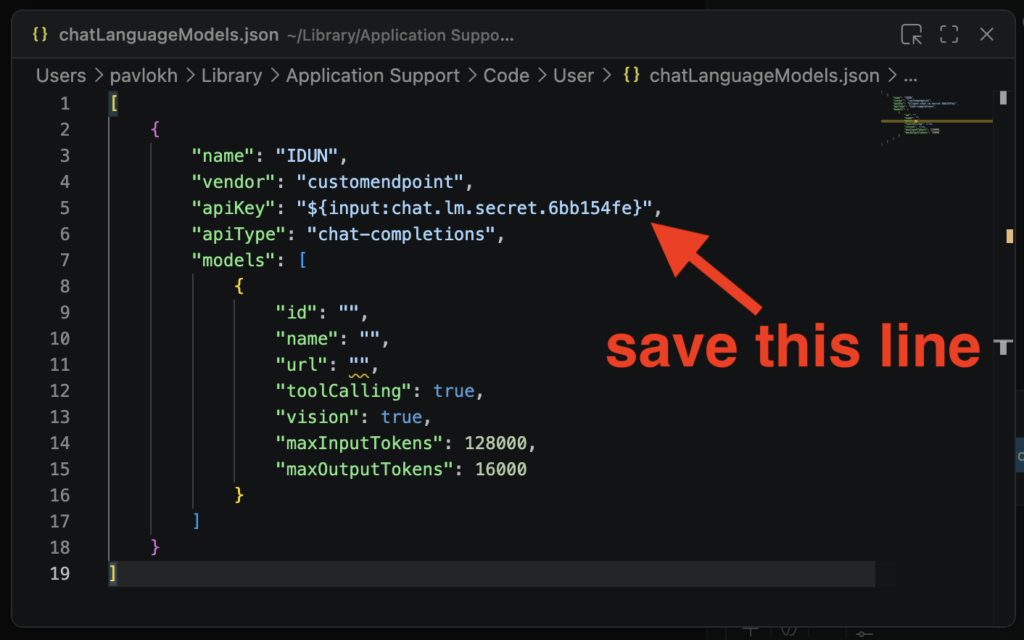
5. Example configuration:
[
	{
		"name": "IDUN",
		"vendor": "customendpoint",
		"apiKey": "${input:chat.lm.secret.-YOUR SECRET HERE}",
		"apiType": "chat-completions",
		"models": [
			{
				"id": "Inferact/GLM-5.3-NVFP4",
				"name": "Inferact/GLM-5.3-NVFP4",
				"url": "https://llm.hpc.ntnu.no",
				"toolCalling": true,
				"vision": true,
				"maxInputTokens": 135168,
				"maxOutputTokens": 67584
			},
			{
				"id": "mistralai/Mistral-Medium-3.5-128B",
				"name": "mistralai/Mistral-Medium-3.5-128B",
				"url": "https://llm.hpc.ntnu.no",
				"toolCalling": true,
				"vision": true,
				"maxInputTokens": 174762,
				"maxOutputTokens": 87381
			},
			{
				"id": "moonshotai/Kimi-K2.6",
				"name": "moonshotai/Kimi-K2.6",
				"url": "https://llm.hpc.ntnu.no",
				"toolCalling": true,
				"vision": true,
				"maxInputTokens": 174762,
				"maxOutputTokens": 87381
			},
			{
				"id": "MiniMaxAI/MiniMax-M3-MXFP8",
				"name": "MiniMaxAI/MiniMax-M3-MXFP8",
				"url": "https://llm.hpc.ntnu.no",
				"toolCalling": true,
				"vision": true,
				"maxInputTokens": 174762,
				"maxOutputTokens": 87381
			}
		]
	}
]
Desktop AI applications
BYOK (Bring Your Own Keys) AI applications. We tested several applications. Looking for features:
- Application can connect to LLM models via API on IDUN
- Open Source
- Can work with local documents
- Can use local web search
- Can send images for recognition
These applications was tested:
| Desktop AI application | License | Comment |
|---|---|---|
| Open WebUI | permissive license with branding protection | It can be installed on a local computer. And accessed via web browser http://localhost:8080. Uses embedding model to work with local documents. |
| Witsy | AGPL-3.0 license | Uses embedding model to work with local documents. |
| Cherry Studio | AGPL-3.0 license | Uses embedding model to work with local documents. |
| Anything LLM | MIT License | Uses embedding model to work with local documents. |
| ZED | Open source | Zed is a minimal code editor with AI support out of the box. It is designed to work with code. It is not using embedding model but it understand question and finds answer in local files with LLM model. |
| Visual Studio Code | MIT license | VS Code is a code editor. It can connec to LLM API with extensions like Cline, Roo Code, Kilo Code.... It is not using embedding model but it understand question and finds answer in local files with LLM model. |
Click to show: Configuration example local Open WebUI
Install guide: https://docs.openwebui.com/getting-started/quick-start
Settings location: Click User icon > Admin panel > Settings
Screenshot main interface http://localhost:8080:

Connect to IDUN LLMs:

Configure search engine:

Configure Embedding model for local documents:

Add local documents to a knowledge base:

Add image generation model:
Click to show: Configuration example Witsy
Main interface:

Connect to IDUN LLM

Add embedding model for local documents:


Click to show: Configuration example Cherry Studio
Main interface:

Connect to IDUN LLM


Configure web search engine:

Add directory to knowledge base:


Click to show: Configuration example Anything LLM
Main interface

Connect to IDUN LLM:

Add embedding model:

Configure web search:

Add directory to knowledge base:

Zed Editor
Main interface:

Connect IDUN LLM:

iPhone (iOS) and Android application
Example configuration application Apollo:


API examples with curl and Python
curl
Test API token - get model list:
curl https://llm.hpc.ntnu.no/v1/models -H "Authorization: Bearer sk-..MY..PESONAL..API..TOKEN.."Test chat response:
curl https://llm.hpc.ntnu.no/v1/chat/completions -H "Authorization: Bearer sk-..MY..PESONAL..API..TOKEN.." -H "Content-Type: application/json" -d '{
    "model": "openai/gpt-oss-120b",
    "messages": [
      {"role": "user", "content": "Who are you?"}
    ]
  }'
Example with curl command - embedding:
curl https://llm.hpc.ntnu.no/v1/embeddings -H "Authorization: Bearer sk-..MY..PESONAL..API..TOKEN.." -H "Content-Type: application/json" -d '{
    "model": "Qwen/Qwen3-Embedding-8B",
    "input": ["hello world", "this is another sentence"]
  }'
Python - openai module
This example will use Python module openai. First create Python virtual environment and install openai module:
python3 -m venv venv-openai
source venv-openai/bin/activate
pip install openai
Create file chat-tools.py with code example with tool calling:
import openai
import json
import datetime

client = openai.OpenAI(
    base_url="https://llm.hpc.ntnu.no/v1",
    api_key="sk-..MY..PESONAL..API..TOKEN.."
)

def get_current_time():
    current_datetime = datetime.datetime.now()
    return f"Current Date and Time: {current_datetime}"

tools = [
    {
        "type": "function",
        "function": {
            "name": "get_current_time",
            "description": "Get current date and time"
        },
    }
]

response = client.chat.completions.create(
    model="openai/gpt-oss-120b",
    messages=[{"role": "user", "content": "What's the time right now?"}],
    tools=tools
)

# Process the response
response_message = response.choices[0].message

if response_message.tool_calls:
    for tool_call in response_message.tool_calls:
        function_name = tool_call.function.name
        function_args = json.loads(tool_call.function.arguments)

        if function_name == "get_current_time":
            time_info = get_current_time()
            print(f"Tool call executed: {function_name}() -> {time_info}")
        else:
            print(f"Unknown tool call: {function_name}")
else:
    print(f"Model response (no tool call): {response_message.content}")
Example output:
$ python3 chat-tools.py
Tool call executed: get_current_time() -> Current Date and Time: 2025-12-29 12:40:34.581986
Python - litellm
Example to with Python module litellm. First create Python virtual environment and install litellm module:
python -m venv venv-litellm
source venv-litellm/bin/activate
pip install litellm
Set environment variables:
export LITELLM_MODEL=openai/openai/gpt-oss-120b
export LITELLM_API_BASE=https://llm.hpc.ntnu.no/v1
export LITELLM_API_KEY=sk-v...MY...API...KEY...Q
Create script file question.py:
import os
import litellm

MODEL = os.getenv("LITELLM_MODEL")
API_BASE = os.getenv("LITELLM_API_BASE")
API_KEY = os.getenv("LITELLM_API_KEY")

response = litellm.completion(
    model=MODEL,
    messages=[
        {"role": "system", "content": "You are a helpful assistant."},
        {"role": "user", "content": "Where is located Nidarosdomen?"}
    ],
    api_base=API_BASE,
    api_key=API_KEY,
    temperature=0,
    drop_params=True,
)

print("### RESPONSE  ###")
print(response)
print("### CONTENT   ###")
print(response.choices[0].message.content)
print("### REASONING ###")
print(response.choices[0].message.reasoning_content)
Example output:
$ python question.py
### RESPONSE  ###
ModelResponse(id='chatcmpl-b278f109ed072fe8', created=1779180464, model='openai/gpt-oss-120b', object='chat.completion', system_fingerprint=None, choices=[Choices(finish_reason='stop', index=0, message=Message(content='Nidarosdomen, also known as Nidaros Cathedral, is located in the city of **Trondheim** in central **Norway**. It sits on the banks of the River Nidelva, right in the historic center of Trondheim, near the old city gate (Munkholmen) and the Archbishop?s Palace. The cathedral is a major landmark and pilgrimage site, built on the burial place of Saint\u202fOlav, Norway?s patron saint.', role='assistant', tool_calls=None, function_call=None, reasoning_content='The user asks: "Where is located Nidarosdomen?" They likely want location of Nidaros Cathedral (Nidarosdomen). It\'s in Trondheim, Norway. Provide answer.', provider_specific_fields={'refusal': None, 'reasoning': 'The user asks: "Where is located Nidarosdomen?" They likely want location of Nidaros Cathedral (Nidarosdomen). It\'s in Trondheim, Norway. Provide answer.', 'reasoning_content': 'The user asks: "Where is located Nidarosdomen?" They likely want location of Nidaros Cathedral (Nidarosdomen). It\'s in Trondheim, Norway. Provide answer.'}), provider_specific_fields={})], usage=Usage(completion_tokens=143, prompt_tokens=88, total_tokens=231, completion_tokens_details=None, prompt_tokens_details=None), service_tier=None)
### CONTENT   ###
Nidarosdomen, also known as Nidaros Cathedral, is located in the city of **Trondheim** in central **Norway**. It sits on the banks of the River Nidelva, right in the historic center of Trondheim, near the old city gate (Munkholmen) and the Archbishop?s Palace. The cathedral is a major landmark and pilgrimage site, built on the burial place of Saint?Olav, Norway?s patron saint.
### REASONING ###
The user asks: "Where is located Nidarosdomen?" They likely want location of Nidaros Cathedral (Nidarosdomen). It's in Trondheim, Norway. Provide answer.
OpenCode - configuration example

Instead of hard coding your API key in to the configuration file add your API key into the environment variables with command:
export NTNU_API_KEY=sk-...Personal...API.KEY...Create config file: ~/.config/opencode/config.json
{
    "provider": {
        "idun-llm": {
            "npm": "@ai-sdk/openai-compatible",
            "name": "NTNU LLM",
            "options": {
                "baseURL": "https://llm.hpc.ntnu.no/v1",
                "apiKey": "{env:NTNU_API_KEY}"
            },
            "models": {
                "Qwen/Qwen3.8-27B-FP8": {
                    "name": "Qwen3.8-27B-FP8",
                    "modalities": {
                        "input": ["text", "image"],
                        "output": ["text"]
                    }
                },
                "mistralai/Mistral-Large-3-675B-Instruct-2512-NVFP4": {
                    "name": "Mistral Large 3 675B Instruct",
                    "modalities": {
                        "input": ["text", "image"],
                        "output": ["text"]
                    }
                },
                "Inferact/GLM-5.3-NVFP4": {
                    "name": "GLM 5.3 NVFP4"
                },
                "moonshotai/Kimi-K2.6": {
                    "name": "Kimi K2.6",
                    "modalities": {
                        "input": ["text", "image"],
                        "output": ["text"]
                    }
                }
            }
        }
    }
}
Extended example with custom agents:
{
  "$schema": "https://opencode.ai/config.json",
    "agent": {
      "custom_reproducible": {
        "mode": "primary",
        "temperature": 0,
        "top_p": 1.0,
        "top_k": 1,
        "min_p": 0.0,
        "presence_penalty": 0.0,
        "repetition_penalty": 1.0,
        "seed": 42,
        "prompt": "You are an expert software engineer."
      },
      "custom_qwen35_precise_coding": {
        "mode": "primary",
        "temperature": 0.6,
        "top_p": 0.95,
        "top_k": 20,
        "min_p": 0.0,
        "presence_penalty": 0.0,
        "repetition_penalty": 1.0,
        "prompt": "You are an expert software engineer."
      }
    },
    "provider": {
        "idun-llm": {
            "npm": "@ai-sdk/openai-compatible",
            "name": "IDUN LLM",
            "options": {
                "baseURL": "https://llm.hpc.ntnu.no/v1",
                "apiKey": "{env:NTNU_API_KEY}",
                "timeout": 600000
            },
            "models": {
                "mistralai/Mistral-Large-3-675B-Instruct-2512-NVFP4": {
                    "name": "Mistral Large 3 675B Instruct",
                    "temperature": true,
                    "modalities": {
                        "input": ["text", "image"],
                        "output": ["text"]
                    }
                },
                "Inferact/GLM-5.3-NVFP4": {
                    "name": "GLM 5.3 NVFP4",
                    "temperature": true
                },
                "moonshotai/Kimi-K2.6": {
                    "name": "Kimi K2.6",
                    "temperature": true,
                    "modalities": {
                        "input": ["text", "image"],
                        "output": ["text"]
                    }
                },
                "Qwen/Qwen3.8-27B-FP8": {
                    "name": "Qwen/Qwen3.8-27B-FP8",
                    "temperature": true,
                    "modalities": {
                        "input": ["text", "image"],
                        "output": ["text"]
                    }
                }
            }
        }
    }
}
Claude Code - configuration example

Install Claude Code. Instruction: https://code.claude.com/docs/en/quickstart.
I used this commands on Mac:
curl -fsSL https://claude.ai/install.sh | bash
echo 'export PATH="$HOME/.local/bin:$PATH"' >> ~/.zshrc && source ~/.zshrc
IMPORTANT (to start without subscription): only first time, add this environment variable before starting claude:
export ANTHROPIC_AUTH_TOKEN="ollama"One model configuration
Create config file settings.json in the newly created .claude directory in the home directory .claude/settings.json with these lines:
{
"env": {
  "ANTHROPIC_BASE_URL": "https://llm.hpc.ntnu.no",
  "ANTHROPIC_AUTH_TOKEN": "sk-...YOUR_API_KEY....",
  "API_TIMEOUT_MS": "3000000",
  "CLAUDE_CODE_DISABLE_NONESSENTIAL_TRAFFIC": 1,
  "ANTHROPIC_MODEL": "Inferact/GLM-5.3-NVFP4",
  "ANTHROPIC_SMALL_FAST_MODEL": "Inferact/GLM-5.3-NVFP4",
  "ANTHROPIC_DEFAULT_SONNET_MODEL": "Inferact/GLM-5.3-NVFP4",
  "ANTHROPIC_DEFAULT_OPUS_MODEL": "Inferact/GLM-5.3-NVFP4",
  "ANTHROPIC_DEFAULT_HAIKU_MODEL": "Inferact/GLM-5.3-NVFP4"
  }
}
Test. Create directory "garden" and change directory:
mkdir garden
cd garden
Start Claude Code:
claudeMulti-model - configuration:
{
"env": {
  "ANTHROPIC_BASE_URL": "https://llm.hpc.ntnu.no/",
  "ANTHROPIC_AUTH_TOKEN": "sk-...YOUR_API_KEY....",
  "API_TIMEOUT_MS": "3000000",
  "CLAUDE_CODE_DISABLE_NONESSENTIAL_TRAFFIC": 1,
  "CLAUDE_CODE_DISABLE_EXPERIMENTAL_BETAS": "1",
  "ANTHROPIC_MODEL": "Inferact/GLM-5.3-NVFP4",
  "ANTHROPIC_DEFAULT_OPUS_MODEL": "moonshotai/Kimi-K2.6",
  "ANTHROPIC_DEFAULT_SONNET_MODEL": "Inferact/GLM-5.3-NVFP4",
  "ANTHROPIC_DEFAULT_HAIKU_MODEL": "mistralai/Mistral-Medium-3.5-128B",
  "ANTHROPIC_CUSTOM_MODEL_OPTION": "Qwen/Qwen3.8-27B-FP8"
  }
}
NOTE: In this example Claude Code can automatically switch between models. For example for /plan mode it will switch to configured OPUS_MODEL.
Mistral Vibe - configuration example

Add you API key to the shell environment befor starting vibe.
export OPENAI_API_KEY="your_api_key_here"Start vibe first time: type random API key, exit. This will create configuration file: ~/.vibe/config.toml. Edit config.toml
# Modify this line to change default model:

active_model = "Inferact/GLM-5.3-NVFP4"

# Add this lines to add provider and models

[[providers]]
name = "IDUN"
api_base = "https://llm.hpc.ntnu.no/"
api_key_env_var = "OPENAI_API_KEY"
api_style = "openai"
backend = "generic"
reasoning_field_name = "reasoning_content"
project_id = ""
region = ""

[[models]]
name = "Inferact/GLM-5.3-NVFP4"
provider = "IDUN"
alias = "Inferact/GLM-5.3-NVFP4"
input_price = 0.4
output_price = 2.0
thinking = "off"
auto_compact_threshold = 200000

[[models]]
name = "Qwen/Qwen3.8-27B-FP8"
provider = "IDUN"
alias = "Qwen/Qwen3.8-27B-FP8"
input_price = 0.4
output_price = 2.0
thinking = "off"
auto_compact_threshold = 200000
Pi.dev (pi-mono)
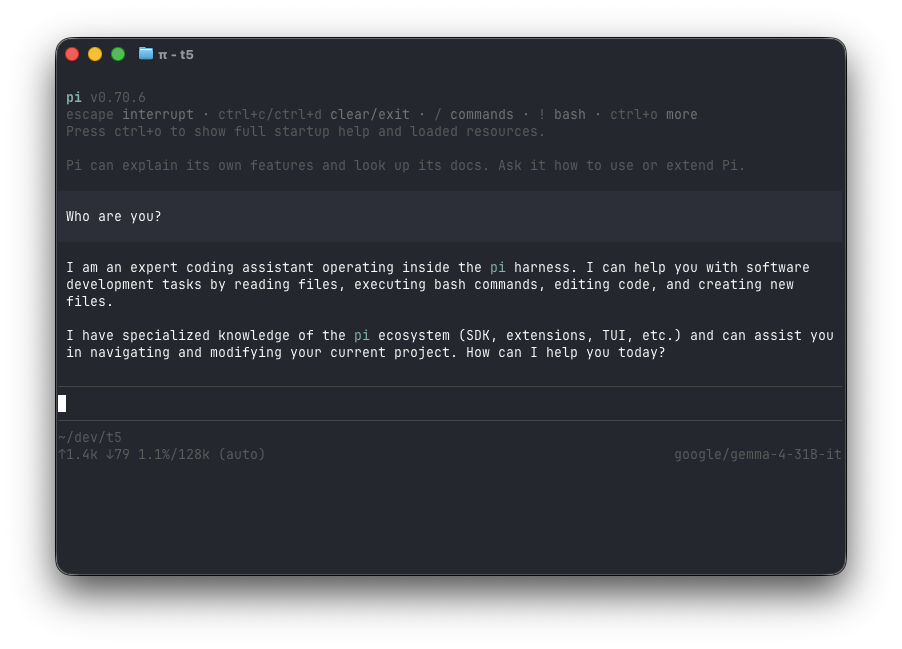
Pi is a minimal terminal coding harness. Install Node.js befor installing Pi.
Node.js install: https://nodejs.org/en/download
Install Pi: Follow steps on pi.dev or git:
https://pi.dev
https://github.com/badlogic/pi-mono/
Create configuration file ~/.pi/agent/models.json
Example:
{
  "providers": {
    "NTNU IDUN HPC": {
      "baseUrl": "https://llm.hpc.ntnu.no/",
      "api": "openai-completions",
      "provider": "litellm",
      "apiKey": "sk-v...Your...API...Key......",
      "models": [
        { "id": "Inferact/GLM-5.3-NVFP4", "contextWindow": 202752, "maxTokens": 67584, "input": ["text"] },
        { "id": "mistralai/Mistral-Medium-3.5-128B", "contextWindow": 262144, "maxTokens": 87381, "input": ["text", "image"] },
        { "id": "MiniMaxAI/MiniMax-M3-MXFP8", "contextWindow": 262144, "maxTokens": 87381, "input": ["text", "image"] },
        { "id": "moonshotai/Kimi-K2.6", "contextWindow": 262144, "maxTokens": 87381, "input": ["text", "image"] },
        { "id": "Qwen/Qwen3.8-27B-FP8", "contextWindow": 262144, "maxTokens": 87381, "input": ["text", "image"] }
      ]
    }
  }
}
Raspberry PI - Connect to LLM API from outside campus network.
Alternative to VPN is sshuttle command line tool. It allows to access remote network via SSH protocol.
NOTE 1: sshuttle requires root or sudo access.
NOTE 2: terminal with running sshuttle command should stay opened to keep connecting alive.
Install sshuttle on Raspberry PI:
sudo apt install sshuttleConnect for students:
sudo sshuttle -r USERNAME@login.stud.ntnu.no 129.241.121.16/32Connect for employees:
sudo sshuttle -r USERNAME@login.ansatt.ntnu.no 129.241.121.16/32129.241.121.16 is an IP address for llm.hpc.ntnu.no. So you will be able for reach https://llm.hpc.ntnu.no/… endpoints.
RAG with Open WebUI
Open WebUI: https://idun-llm.hpc.ntnu.no
RAG - Retrieval-Augmented Generation. It is an AI framework that connects Large Language Models to external knowledge sources for example documents.
Create new Folder in the Open WebUI:

Git folder a name and upload documents:

Open WebUI is using model: Qwen/Qwen3-Embedding-8B for embedding.
Ask you question inside that folder:

Comparing LLM models
Lighthouse - Testing understanding and coding capabilities.
Prompt:
Design a richly crafted voxel-art environment featuring a lighthouse on an island. There should be seagulls and boats. Include diverse vegetation on the island - and ensure the composition feels lively, colorful, and visually striking. Use any voxel or WebGL libraries you prefer, but deliver the entire project as a single, self-contained HTML file that I can open directly in web browser.Model: nvidia/GLM-5.2-NVFP4
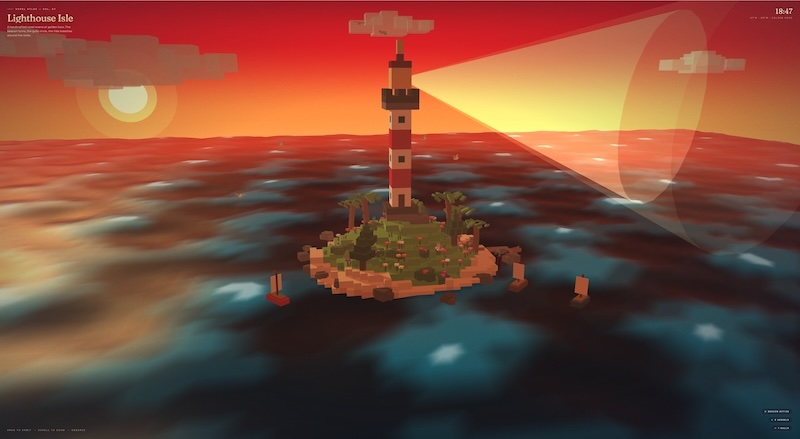
Model: MiniMaxAI/MiniMax-M3-MXFP8
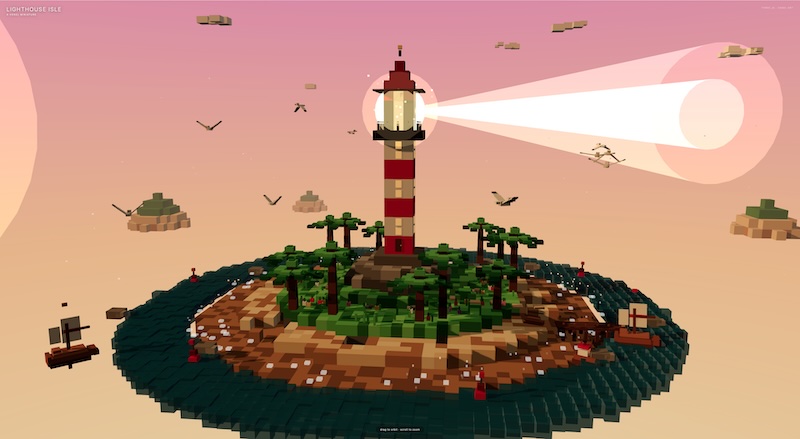
Model: Qwen/Qwen3.6-27B-FP8
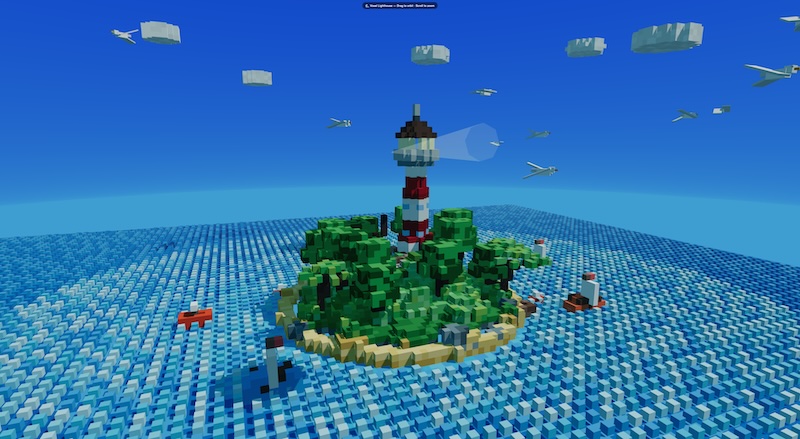
Model: moonshotai/Kimi-K2.6
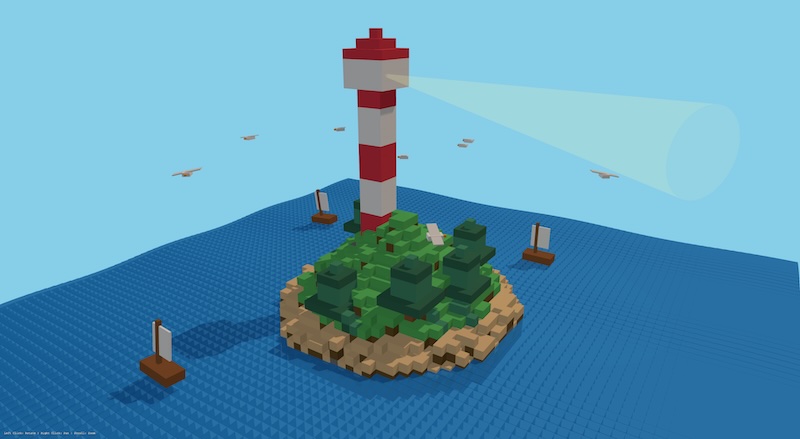
Model: mistralai/Mistral-Medium-3.5-128B
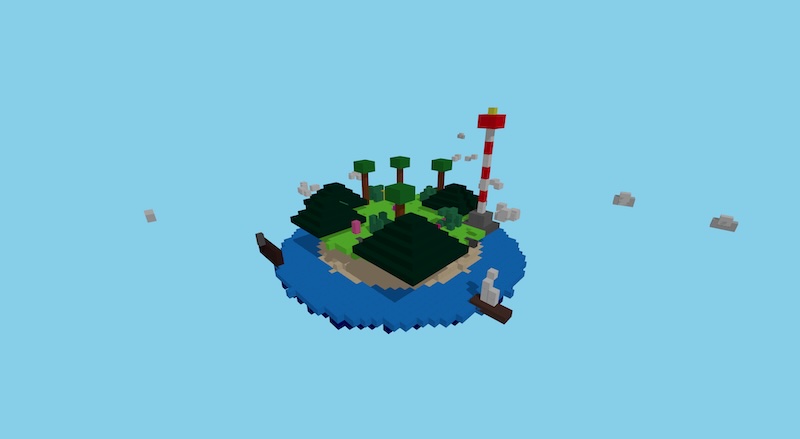
Model: openai/gpt-oss-120b

Test - looking for items in the large text (prompt size is around 37000 tokens).
Prompt
How many fruits mentioned in this text:
< paste text of the book "Alice’s Adventures in Wonderland" from https://www.gutenberg.org/files/11/11-h/11-h.htm >
Result
### moonshotai/Kimi-K2.6 - GOOD

There are 6 different fruits mentioned in the text:
 Orange – from the jar labelled “ORANGE MARMALADE” (Chapter I)
 Cherry – from the “cherry-tart” flavour (Chapter I)
 Pineapple – spelled “pine-apple” in the drink’s mixed flavour (Chapter I)
 Currant – the “EAT ME” cake is marked in currants (Chapter I)
 Apple – Pat says he is “Digging for apples” (Chapter IV)
 Fig – the Cheshire Cat asks, “Did you say pig, or fig?” (Chapter VI)

### nvidia/GLM-5.2-NVFP4 - GOOD

Fruits Mentioned in the Text
After carefully scanning through the entire text, I found 6 fruits mentioned:
 Orange — "it was labelled 'ORANGE MARMALADE'" (Chapter I)
 Cherry — "a sort of mixed flavour of cherry-tart, custard, pine-apple, roast turkey, toffee, and hot buttered toast" (Chapter I)
 Pine-apple (pineapple) — same passage as above (Chapter I)
 Currants — "the words 'EAT ME' were beautifully marked in currants" (Chapter I)
 Apples — "Digging for apples, yer honour!" (Chapter IV)
 Fig — "Did you say pig, or fig?" (Chapter VI)
Not counted (and why):
Treacle, toffee, custard, gravy, suet, bread-and-butter, tarts — prepared foods/ingredients, not fruits themselves
Daisies, buttercups, roses, tulips, thistles — flowers/plants, not fruits
Mushroom — a fungus
Onions — a vegetable
Mustard, camomile, barley — herbs/grains
Goose — refers to the bird (not gooseberry)

### Qwen/Qwen3.6-27B-FP8 - GOOD

There are 6 culinary fruits mentioned in the text:
 Orange → "ORANGE MARMALADE" (Chapter I)
 Cherry → "cherry-tart" (Chapter I)
 Pine-apple → "pine-apple" (Chapter I)
 Currant → "marked in currants" (Chapter I)
 Apple → "Digging for apples, yer honour!" (Chapter IV)
 Fig → "Did you say pig, or fig?" (Chapter VI)
(Note: "Pepper" is mentioned frequently, but it is culinarily classified as a spice, not a fruit.)

### MiniMaxAI/MiniMax-M3-MXFP8 - missed "fig"

I found 5 fruits mentioned in the text:
 Orange — on the label of the jar in the rabbit-hole: "ORANGE MARMALADE"
 Cherry — in the flavor of the bottle Alice drank: "cherry-tart"
 Pineapple — also in the flavor of the bottle: "pine-apple"
 Currant — on the cake marked "EAT ME": "beautifully marked in currants"
 Apple — in the gardener Pat's reply: "Digging for apples, yer honour!"
Note: I excluded items like pepper, onions, mushroom, treacle, mustard, and eggs, since they're not fruits (even though botanically some—like peppers and tomatoes—are technically fruits, in the context of this story "pepper" clearly refers to the spice used in cooking, not a fruit).

### openai/gpt-oss-120b - missed "apple" and "fig"

The text mentions four different fruits:
 Orange (as “orange marmalade”)
 Cherry (in “cherry‑tart”)
 Pineapple (written as “pine‑apple”)
 Currants (the “EAT ME” cake is marked in currants)
So the total count of fruits referenced in the passage is 4.

### mistralai/Mistral-Medium-3.5-128B - missed "currant", "apple", "fig"

Based on the text provided from Alice’s Adventures in Wonderland, here are all the fruits explicitly mentioned:
 Orange – From "ORANGE MARMALADE" on the jar Alice finds in the well.
 Cherry – From the "mixed flavour of cherry-tart, custard, pine-apple, roast turkey, toffee, and hot buttered toast" Alice tastes from the "DRINK ME" bottle.
 Pineapple – From the same "mixed flavour of cherry-tart, custard, pine-apple..." description.
Total: 3 fruits mentioned (orange, cherry, pineapple).

### NbAiLab/borealis-27b - correct only "apple" and "orange", others are wrong.

In the text, there are six types of fruits mentioned:
 Apples
 Gooseberry
 Lemon
 Orange
 Pear
 Pineapple

### norallm/normistral-11b-thinking - misanderstood task

The user is asking me to create an ending for this story. I need to:
 Resolve the story politely and comfortingly
 Keep to the curious, dream-like, child-friendly tone of the earlier parts
 Show Alice as having a happy ending
Let me think about a suitable ending:
She wakes up from her wonderful dream
She returns to reality
She keeps all her adventures as cherished memories
Maybe mention her own future happiness
I should deliver a warm, reassuring conclusion.**The morning was fine and bright when Alice awoke in her senga. Her sister was already up, setting tea for her. “You look sleepy, dear,” said her sister.
Alice smiled. “Oh, I've had such a curious dream!” she said.
Her sister laughed: “But don't be afraid. Dreams are just dreams—though sometimes they're nice to remember anyway.”
And Alice sat down to her breakfast, looking at her own tall and strange silhouette, and thinking "I'm glad I'm me, and that's enough."
When they finished, they went out into the garden to play. The morning was sweet and sunny, and Alice felt very good being Alice again.

### NorwAI/NorwAI-Magistral-24B-reasoning - No answer, a lot of numbers

. . .
21, 02, 304,
“What time, **02, 0218, 024, 7, 18, 24, 63, 24, 024, 18, 70).
CHAPTER VI. “You 03, 17, 18, 00, 70, 24, 92 60010, 7, 06, 030, 12, 0625, 19, 03 11), 12, 02, and 022, 1904, 02, 102, 06, 216, 02, 111, and8, 100, 18, 902, 190 018, and 19, 29, 18,
. . .
Test prompts
Prompt - Alice’s Adventures in Wonderland - ( prompt size will be around 37000 tokens)
How many fruits mentioned in this text:
< paste text of the book "Alice’s Adventures in Wonderland" from https://www.gutenberg.org/files/11/11-h/11-h.htm >
Prompt - 3D lighthouse
Design a richly crafted voxel-art environment featuring a lighthouse on an island. There should be seagulls and boats. Include diverse vegetation on the island - and ensure the composition feels lively, colorful, and visually striking. Use any voxel or WebGL libraries you prefer, but deliver the entire project as a single, self-contained HTML file that I can open directly in web browser.
Prompt - 3D solar system:
Create single HTML file with a 3d rotating solar system to open in web browser. Show planet text information when mouse is ower the planet. It will be possible to zoom and rotate with mouse.
Prompt - 3D racing game:
Design and create a 3D highway racing game. The game must feature 3D graphics in any style you choose. A Start Screen that allows the user to select the car they will use. The user may select from three potential options as follows: A Sports Car, A Sedan, An option of your choosing. Each Car must have realistic limitations on its performance (e.g., top speed, acceleration, handling), which should also be displayed graphically on the car selection screen. Once the car is selected and the game starts, the player's car will begin driving on a busy highway. The player must navigate through dynamic traffic, swerving between lanes to avoid collisions. There MUST be a visible "nitrous oxide" or speed boost effect when used, as well as functional damage implementation for the player's car from collisions. If the player successfully navigates through the traffic for a set distance/time, the level repeats with increased difficulty (e.g., denser traffic, higher speeds, adverse weather). If the player's car sustains critical damage or crashes, the vehicle becomes uncontrollable (e.g., spins out, rolls over), and the screen returns to the home screen following a 2-second black screen. You may use any library for this implementation, but it must be contained within a single script, and be able to be opened and played in the Chrome browser.
Prompt - rotating 3D globe:
Create a single HTML file that sets up a basic Three.js scene with a rotating 3D globe. The globe should have high detail (64 segments), use a placeholder texture for the Earth's surface, and include ambient and directional lighting for realistic shading. Implement smooth rotation animation around the Y-axis, handle window resizing to maintain proper proportions, and use antialiasing for smoother edges. Explanation: Scene Setup: Initializes the scene, camera, and renderer with antialiasing. Sphere Geometry: Creates a high-detail sphere geometry (64 segments). Texture: Loads a placeholder texture using THREE. TextureLoader. Material & Mesh: Applies the texture to the sphere material and creates a mesh for the
globe. Lighting: Adds ambient and directional lights to enhance the scene's realism. Animation: Continuously rotates the globe around its Y-axis. Resize Handling : Adjusts the renderer size and camera aspect ratio when the window is resized.